Tor Sites Wiki: A Guide to Navigating the Dark Web
This guide is for users seeking to navigate Tor sites and understand the Dark Web's complexities.
- Posted:
- Updated: Oct 10, 2026
- By: Alex Mercer
- 15 minutes
The Tor network hosts over 100,000 .onion sites as of 2023[1]. To navigate these sites safely, the reader should use the Tor Browser, keep it updated, and be cautious of potentially malicious links, especially on directories like The Hidden Wiki[2][3][4]. Some key considerations include:
- Using the Tor Browser for access
- Being aware of potentially malicious links
- Keeping the browser updated for security
Understanding Tor Sites
Tor sites, often referred to as .onion sites, operate within the Tor network. They provide a unique way to access content that prioritizes user anonymity and privacy. Unlike traditional websites, which use standard domain extensions like .com or .org, .onion sites are specifically designed to be accessed through the Tor Browser, which enables users to browse the internet anonymously[2].
The primary purpose of .onion sites includes facilitating secure communication, whistleblowing, and sharing information that may be censored elsewhere[5]. There are currently over 100,000 .onion sites on the Tor network, highlighting the diversity of content available[1]. However, it is essential to approach these sites with caution. While visiting .onion sites is not illegal by itself, the legality of the content accessed can vary significantly[6].
Anonymity is a critical feature of the Tor network. Users can browse without revealing their IP addresses, making it difficult for outside entities to track their online activities. This capability is particularly valuable for individuals living in oppressive regimes or for those seeking to communicate sensitive information securely.
It's important to note that the Tor network also harbors risks. Many .onion sites may contain illegal or harmful content, and users could inadvertently access such material[7]. Therefore, navigating these sites requires a careful approach.
Here are some recommendations for safely exploring .onion sites:
- Always use the Tor Browser for access.
- Keep the Tor Browser updated to maintain security[4].
- Be cautious of links found on directories like The Hidden Wiki, which may lead to malicious sites[3].
- Consider using a VPN in combination with Tor for additional security[8].
- Familiarize yourself with advanced configurations, such as using bridges, to enhance your security and avoid censorship[9].
By following these guidelines, users can better navigate the complexities of the Dark Web while protecting their anonymity.
Navigating Tor Sites Safely
To browse Tor sites safely, follow these essential tips. Start by using the Tor Browser, the recommended tool for accessing .onion sites. This browser is specifically designed to maintain user anonymity and protect against tracking[2].
Keeping the Tor Browser updated is crucial. Regular updates patch security vulnerabilities, helping to protect against potential threats[4].
Be cautious with links you click. Directories like The Hidden Wiki contain many .onion site links, but they can also host malicious content. Always verify the trustworthiness of a link before clicking[3].
Consider the following best practices for safe browsing:
- Use the Tor Browser: This is the only recommended way to access .onion sites.
- Keep the browser updated: Install updates promptly to enhance security[4].
- Verify links: Be skeptical of links from directories, particularly if they seem dubious.
- Avoid downloads: Downloading files from unknown sources can expose your device to malware.
- Combine Tor with a VPN: This adds an extra layer of security by masking your IP address further[8].
Understanding the risks is vital. While visiting .onion sites isn't illegal, the content may be. Always be aware of the legality of what you access[6].
For mobile users, Tor can be used, but it requires careful setup to ensure security[10]. Advanced configurations, such as using bridges, can also enhance your security while accessing the Tor network[9].
By adhering to these guidelines, the reader can enjoy a safer experience while navigating the complexities of the Dark Web.
Popular Tor Sites and Their Uses
Navigating the Tor network reveals a variety of popular .onion sites, each serving distinct purposes. Understanding these can enhance your experience while ensuring safety.
Search Engines
One of the primary functions of Tor sites is to facilitate anonymous searching. Search engines like DuckDuckGo and Not Evil provide users with the ability to search the Dark Web without revealing their identities. These engines index .onion sites and are essential for discovering various resources securely.
Marketplaces
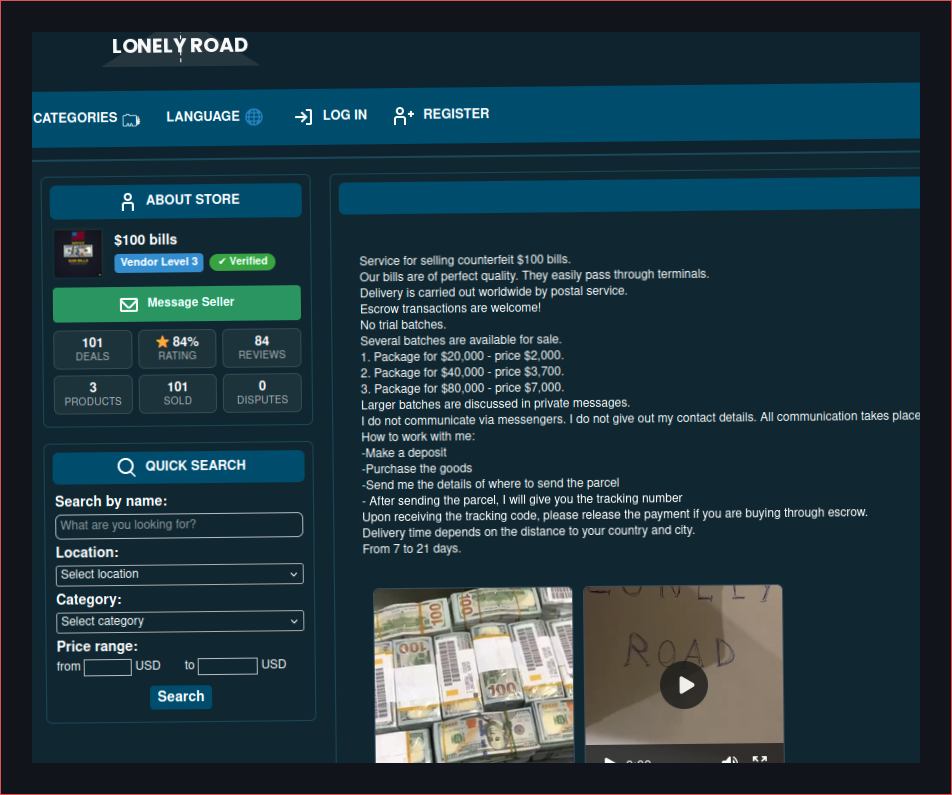
Tor hosts several marketplaces that offer goods and services, often operating under a veil of anonymity. These sites can range from legal products to illicit items. While some marketplaces have garnered reputations for reliability, others have been associated with scams and illegal activities. Users should exercise extreme caution and research the legitimacy of a marketplace before proceeding.
Forums and Communities
Forums such as 8kun and The Hub allow users to discuss various topics anonymously. These platforms can foster community and support for sensitive issues. However, the content can vary widely, and users may encounter harmful or illegal discussions. Always evaluate the credibility of the information shared in these spaces.
Whistleblowing Platforms
SecureDrop and similar services provide a safe channel for whistleblowers to share information with journalists. These platforms prioritize user anonymity and are vital for exposing corruption or wrongdoing. Their usage is legal, but users should ensure they are familiar with the legal implications of the information they choose to share[6].
Risks and Legitimacy
While many .onion sites serve legitimate purposes, the risk of encountering illegal or harmful content is significant. A major concern is that not all links, especially those found on directories like The Hidden Wiki, are safe. Some may lead to malicious sites or scams[3][7].
To mitigate these risks, users should:
- Use trusted search engines to find .onion sites.
- Research marketplaces before making any transactions.
- Be cautious when engaging in forums and discussions.
- Familiarize themselves with whistleblowing platforms and their legalities.
Regularly updating the Tor Browser enhances security[4]. Additionally, combining Tor with a VPN can provide extra protection[8]. By remaining vigilant and informed, users can navigate the diverse landscape of Tor sites safely.
Security Measures for Tor Users
Navigating the Tor network requires a strong focus on security. Implementing effective security measures can significantly enhance user safety while exploring .onion sites.
Use a VPN
Combining Tor with a VPN offers additional layers of security. A VPN masks your IP address and encrypts your internet traffic, making it harder for anyone to track your online activities. This is particularly beneficial when accessing sensitive content or communicating through secure channels. It’s important to select a reputable VPN service that does not keep logs of user activity[8].
Keep Software Updated
Keeping the Tor Browser updated is essential for maintaining security. Regular updates address vulnerabilities and improve the overall security of the browser. The Tor Project emphasizes the importance of installing updates promptly to protect against potential threats[4].
Secure Communication Channels
Using secure communication channels is vital when sharing sensitive information. Platforms like SecureDrop allow whistleblowers to communicate safely with journalists. These services prioritize anonymity and encryption, reducing the risk of exposure[5].
Additional Recommendations
- Avoid Downloads: Downloading files from unknown sources can introduce malware to your device. Be cautious with any content that requires downloading.
- Verify Links: Be skeptical of links found on directories like The Hidden Wiki. Some may lead to malicious sites, so always verify their trustworthiness before clicking[3].
- Use Advanced Configurations: Consider using advanced settings, such as bridges, which can enhance security and help circumvent censorship[9].
These measures are effective if properly implemented. However, they may not suit all users, especially those with limited technical knowledge.
By following these guidelines, users can navigate the complexities of the Dark Web more safely and securely.
The Role of The Hidden Wiki
The Hidden Wiki serves as a directory for .onion sites on the Tor network. It provides users with links to various resources, including forums, marketplaces, and more. However, utilizing The Hidden Wiki comes with significant risks due to potentially malicious links that can lead to harmful content or scams[3].
Accessing The Hidden Wiki is straightforward. First, ensure you have the Tor Browser installed, as it is the only recommended way to access .onion sites safely[2]. Once the browser is set up, you can enter the URL for The Hidden Wiki. However, be aware that links may change frequently due to the nature of the Dark Web.
Importance of The Hidden Wiki
The Hidden Wiki plays a crucial role in navigating the vast number of .onion sites available. As of 2023, there are over 100,000 .onion sites on the Tor network[1]. These sites serve various purposes, including secure communication, whistleblowing, and sharing information that may be censored elsewhere[5]. While The Hidden Wiki can help users discover these resources, it is essential to approach it with caution.
Safe Access Tips
- Use the Tor Browser: Always access The Hidden Wiki and other .onion sites using the Tor Browser to maintain anonymity[2].
- Be Cautious of Links: Not all links on The Hidden Wiki are safe. Verify the trustworthiness of a link before clicking, as some may lead to illegal or harmful content[3][7].
- Keep Software Updated: Regularly updating the Tor Browser is vital for security. Updates help patch vulnerabilities that could be exploited by malicious sites[4].
- Consider Additional Security: Combining Tor with a VPN can provide an extra layer of security, further masking your IP address and encrypting your traffic[8].
Using The Hidden Wiki can enhance your experience on the Tor network, but it requires vigilance. It is vital to remain aware of the risks associated with accessing .onion sites and to prioritize your security.
Common Risks and How to Avoid Them
Browsing Tor sites presents several risks that users should be aware of. These include malware, phishing, and exposure to illegal content. Understanding these risks can help users navigate the Dark Web more safely.
Common Risks
- Malware: Many .onion sites may contain malware that can infect your device. This often occurs through downloads or malicious scripts.
- Phishing: Users can be targeted through fake sites designed to steal personal information. Phishing attempts are common on less reputable directories.
- Illegal Content: Accessing .onion sites may inadvertently expose users to illegal or harmful materials. While visiting these sites is not illegal, the content accessed may be[6][7].
Mitigation Strategies
To reduce risks when exploring .onion sites, users should follow these guidelines:
- Use the Tor Browser: This is the recommended tool for accessing .onion sites, as it is designed to protect user anonymity and security[2].
- Keep the Tor Browser Updated: Regular updates help patch security vulnerabilities and enhance overall safety[4].
- Be Cautious with Links: Directories like The Hidden Wiki can lead to malicious sites. Verify the trustworthiness of any link before clicking[3].
- Avoid Downloads: Do not download files from unknown sources. This can introduce malware to your device.
- Combine Tor with a VPN: Using a VPN alongside Tor provides an extra layer of security by masking your IP address and encrypting your traffic[8].
- Familiarize with Advanced Configurations: Using bridges can enhance security and help circumvent censorship[9].
Conclusion
By adhering to these strategies, users can mitigate the common risks associated with browsing Tor sites. Staying informed and cautious is crucial for a safer experience in the Dark Web.
Best Practices for Privacy
Maintaining privacy while using Tor is essential. Here are some best practices to enhance your security.
Use the Tor Browser
Always access .onion sites using the Tor Browser. This browser is specifically designed to protect user anonymity and is the only officially recommended tool for this purpose[2].
Secure Email Services
When communicating sensitive information, consider using secure email services. Options like ProtonMail or Tutanota provide end-to-end encryption, ensuring that only the intended recipient can read your messages. This is particularly important when discussing sensitive topics or whistleblowing.
Encrypted Communication
Using encrypted communication platforms is vital. Consider services like Signal or Telegram for messaging. They offer robust encryption and additional privacy features. This is especially important for discussions that may involve sensitive information or whistleblowing activities.
Regular Software Updates
Keeping the Tor Browser updated is crucial for maintaining security. Regular updates address vulnerabilities that could be exploited by malicious actors[4]. Make it a habit to check for updates frequently.
Combining Tor with a VPN
Using a VPN in conjunction with Tor can provide additional security. A VPN masks your IP address and encrypts internet traffic, making it harder for anyone to track your activities online[8]. Select a reputable VPN service that does not log user activity.
Avoiding Malicious Links
Be cautious when clicking links, especially those found on directories like The Hidden Wiki. Not all links are safe, and some may lead to harmful content or scams[3]. Always verify the trustworthiness of a link before proceeding.
Advanced Configurations
For users who are more tech-savvy, consider using advanced configurations like bridges. Bridges can enhance security and help circumvent censorship[9]. This is particularly useful in regions with strict internet restrictions.
Summary
By implementing these best practices, users can significantly enhance their privacy while navigating the Tor network. Prioritizing secure communication, keeping software updated, and being cautious with links are key steps to maintaining safety in the Dark Web.
Advanced Tor Configuration for Enhanced Security
Enhancing security when using Tor is crucial for maintaining anonymity on the Dark Web. Advanced configurations can significantly improve your safety while navigating .onion sites.
Use of Bridges
Bridges are an essential feature for users in regions with strict censorship. They allow access to the Tor network when direct connections are blocked. To configure bridges, follow these steps:
- Open the Tor Browser.
- Go to the "Settings" menu.
- Under "Tor," select "Use a bridge."
- Choose to request a bridge from the Tor Project or use a manually entered bridge.
Using bridges can help bypass restrictions while enhancing your anonymity[9].
Adjusting Security Settings
The Tor Browser allows users to adjust security settings for a more secure experience. Here’s how to do it:
- Open the Tor Browser.
- Click on the shield icon next to the URL bar.
- Select "Advanced Security Settings."
- Choose your desired security level (Standard, Safer, or Safest).
Opting for "Safer" or "Safest" will disable certain features like JavaScript, which can help protect against vulnerabilities.
Combining Tor with a VPN
Using a VPN alongside Tor provides an additional layer of security. A VPN encrypts your internet traffic and masks your IP address, making it harder for anyone to track your online activities. This combination is particularly effective for accessing sensitive content or communicating securely[8].
Regular Updates
Keeping the Tor Browser up to date is vital for security. Updates often include patches for vulnerabilities that could be exploited by malicious actors. Check for updates regularly to ensure you have the latest security enhancements[4].
Avoiding Malicious Content
Be cautious about the content you access on .onion sites. Many directories, such as The Hidden Wiki, can lead to malicious links. Always verify the trustworthiness of a link before clicking, as some may lead to illegal or harmful content[3][7].
Summary of Advanced Configurations
- Use Bridges: Bypass censorship and enhance anonymity.
- Adjust Security Settings: Increase security levels in the Tor Browser.
- Combine with VPN: Add an extra layer of encryption and privacy.
- Keep Updated: Regularly check for Tor Browser updates.
- Verify Links: Always check links for safety before accessing.
By implementing these advanced configurations, users can significantly enhance their security and anonymity while navigating the Tor network.
Typical Mistakes and Misconceptions
When navigating the Dark Web, users often make mistakes that compromise their security and anonymity.
Assuming Tor Browser is Enough for Complete Security
Some users believe that using the Tor Browser alone is sufficient for complete security. However, this is not the case, as additional precautions are necessary to maintain anonymity. The Tor Browser is designed to protect user anonymity, but it is not foolproof[2]. To enhance security, users should consider combining Tor with a VPN and keeping their browser updated.
Misunderstanding the Legality of Visiting .onion Sites
Users often mistakenly believe that visiting .onion sites is illegal. In reality, the legality depends on the content accessed, not the act of visiting .onion sites itself[6]. Users should be aware of the content they access and understand that some .onion sites may host illegal or harmful materials.
Overreliance on Directories like The Hidden Wiki
The Hidden Wiki is a known directory for .onion sites, but it poses risks due to potentially malicious links[3]. Users should be cautious when using such directories and verify the trustworthiness of links before clicking. Relying solely on these directories can lead to exposure to harmful content.
Not Updating the Tor Browser Regularly
Failing to keep the Tor Browser updated can leave users vulnerable to security exploits. Regular updates are essential for maintaining security and patching vulnerabilities[4]. Users should make it a habit to check for updates frequently to ensure they have the latest security enhancements.
Ignoring Advanced Security Configurations
Some users overlook advanced security configurations, such as using bridges, which can enhance security and circumvent censorship[9]. Users should familiarize themselves with these configurations to improve their anonymity and security on the Tor network.
Final Summary
Can the reader navigate the Dark Web safely? Yes, provided they prioritize technical hygiene and skepticism.
- Use the Tor Browser on the "Safest" security level to disable JavaScript.
- Verify all directory links through multiple sources to avoid phishing.
- Install a reputable VPN to mask the Tor usage from your ISP.
- Update the browser immediately when a new version is available.
| Action | Purpose | Tool |
|---|---|---|
| Update Software | Patch vulnerabilities | Tor Browser |
| Mask IP | Hide Tor usage | VPN |
| Bypass Blocks | Avoid censorship | Bridges |
Explore how to resolve connectivity issues by reading the Hidden Wiki Links Not Working: Troubleshooting Guide.
Explore More on the Dark Web
Discover additional guides and resources to enhance your knowledge.
View More Resources